Why machine learning often isn't production-ready without MLOps
Many machine learning projects start with a promising prototype: a model is trained, the first metrics look good and the business value feels within reach. But the real challenge often only begins afterwards. A production ML system doesn't just have to be trained once — it has to work reliably over time. It needs to be versioned traceably, deployed securely, monitored continuously and updated when necessary.
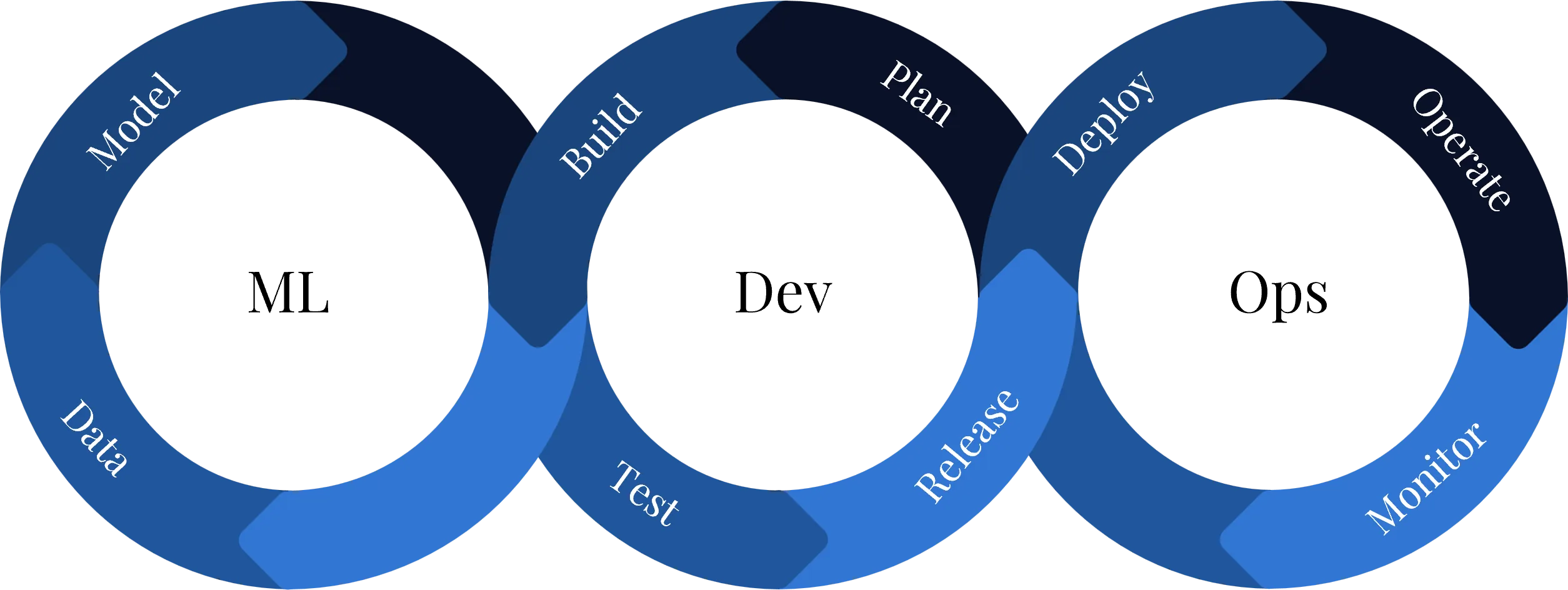
This is exactly where MLOps — Machine Learning Operations — comes in. MLOps combines principles from DevOps, data engineering and cloud operations with the specific requirements of machine learning systems. While classic software consists primarily of code and infrastructure, ML systems add further dimensions: training data, features, model artefacts, experiments, metrics, model versions and potential shifts in the data distribution during operation.
Sculley et al. (2015) show that ML systems can create particular technical debt when data dependencies, model behaviour, pipeline logic and monitoring are not managed cleanly. ML prototypes therefore often look more production-ready than they actually are. Without structured operational processes, the long-term result is high maintenance costs, model decisions that are hard to trace and risky manual interventions.[1]
Production-grade ML systems need their own tests, monitoring mechanisms and quality criteria. It is not enough to look only at model quality in a notebook. What matters is whether the entire system — data, training, deployment and operations — works robustly.[2][11]
What MLOps means in practice
MLOps describes a structured approach to developing, deploying, monitoring and evolving machine learning models across their entire lifecycle. The goal is to treat ML models not as isolated data science artefacts but as production software components that are integrated into business processes.[12][13]
In practice, MLOps covers the following tasks in particular:
- Version dataProvide training data automatically and version it traceably
- Reproducible trainingRun training automatically and repeatably
- Track experimentsDocument parameters, metrics and results end to end
- Model registryManage models as versioned artefacts and release them in a controlled way
- CI/CD deploymentsRoll out deployments automatically and in a controlled way
- MonitoringWatch model, data and infrastructure quality
- RetrainingRetrain models on drift or quality loss
- Security & governanceEnsure access control, compliance and traceability
The key difference from classic DevOps is that it isn't only code that gets deployed. In MLOps, data, models, training environments and evaluation metrics also have to be controlled. MLOps can therefore be described as the combination of ML-specific workflows and operational DevOps practices.[3][4][24]
Why Microsoft Azure is a strong foundation for MLOps
For MLOps, Microsoft Azure offers a strong advantage: the platform combines machine learning, data integration, cloud infrastructure, security, DevOps and monitoring in a single ecosystem. For companies that already use Microsoft technologies, Azure Machine Learning integrates well into existing cloud, data and governance structures.[23]
Microsoft describes the MLOps v2 architecture as a modular pattern with several phases: data estate, administration & setup, model development and model deployment. The exact shape depends on the scenario, but the underlying logic stays the same: data, models, infrastructure and deployment processes are connected through standardised architectural building blocks.[5]
Another advantage is the combination with existing Azure services. These include Azure Machine Learning, Azure Data Lake Storage, Azure Data Factory, Azure DevOps, GitHub Actions, Azure Container Registry, Azure Key Vault, Azure Monitor, Log Analytics, Application Insights, Microsoft Entra ID and Azure Virtual Networks.
This makes Azure especially suitable for companies that don't want to build ML as an isolated experimentation environment but as part of a production-ready, secure and scalable enterprise architecture.
Target architecture: MLOps on Microsoft Azure
A production-grade MLOps architecture on Microsoft Azure consists of several layers. It starts with infrastructure, runs through data, ML and release pipelines, and extends to operations, security and governance. The most important architectural idea is modularity: not every ML project needs the same technical depth. Some use cases only need a controlled model deployment, others require regular retraining, complex data pipelines or a complete end-to-end MLOps setup.
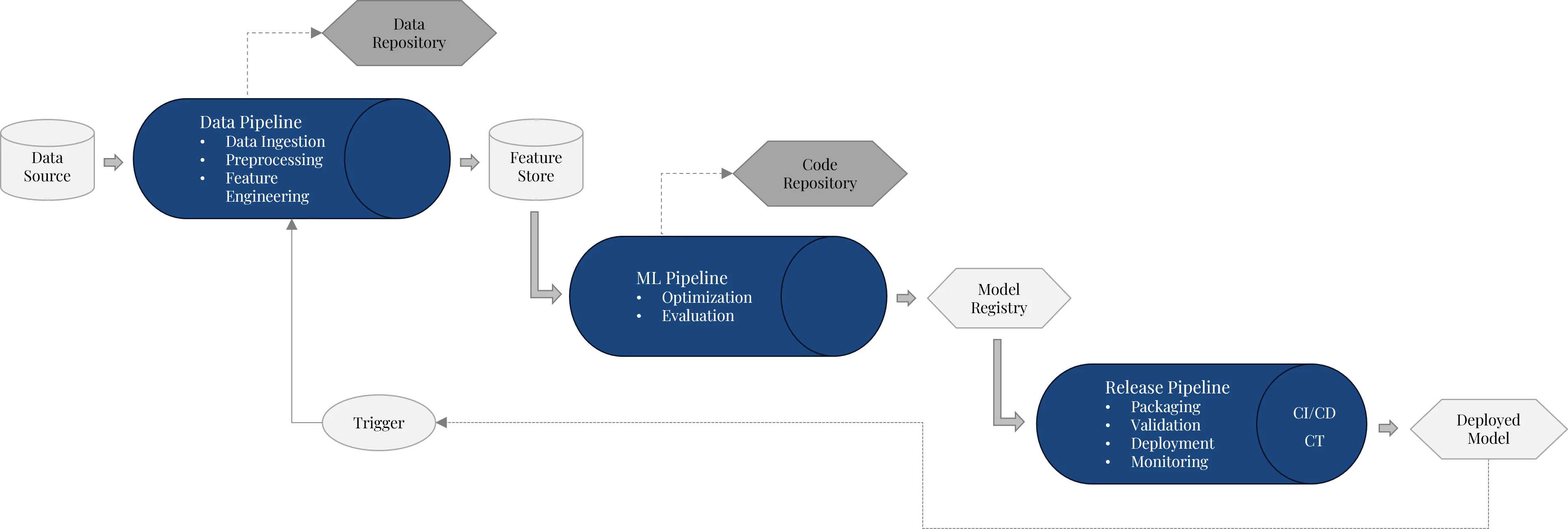
This shows that MLOps is not a linear process. Production ML systems form a closed loop of data provisioning, training, deployment, monitoring and continuous improvement.
1. Infrastructure
Infrastructure is the technical foundation of the entire MLOps architecture. It ensures that data, training processes, model artefacts, deployments and monitoring components run in a controlled Azure environment.
A typical infrastructure for MLOps on Azure looks like this:
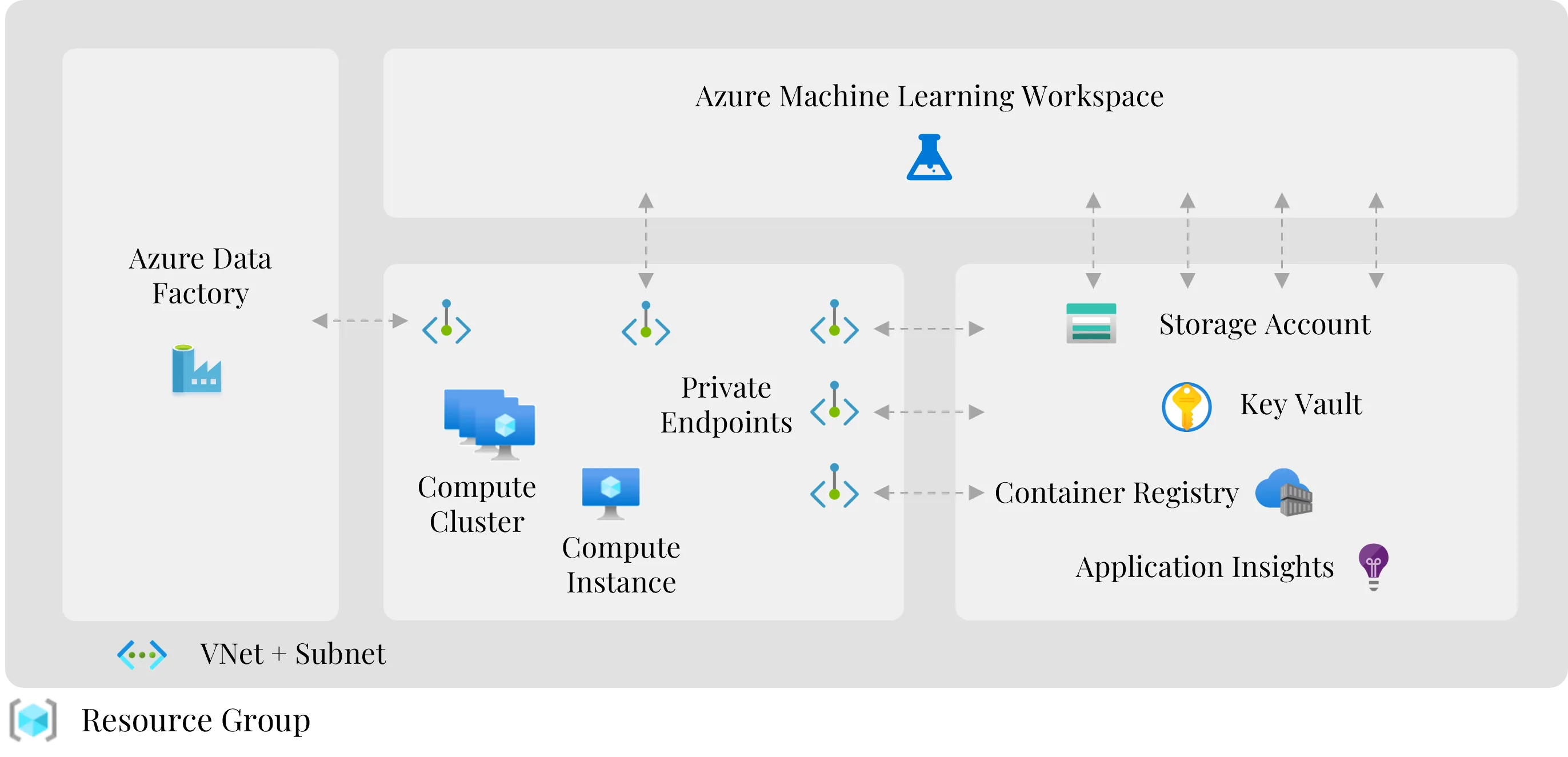
In production ML environments, infrastructure should not be created manually through the Azure Portal. Manual configurations are hard to reproduce, error-prone and quickly lead to drift between development, test and production environments. Instead, infrastructure should be defined as code and versioned.
Microsoft describes Bicep as a declarative infrastructure-as-code language for Azure resources. Bicep files can be treated like application code, making infrastructure changes traceable, repeatable and more consistently deployable. For secure enterprise setups, network isolation matters too: Microsoft recommends securing the Azure Machine Learning workspace and connected resources via virtual networks and private endpoints, so that access to storage, container registry, key vault and other services stays controllable.[10][21]
2. Machine learning pipelines
The actual ML processes sit on top of the infrastructure. They can be divided into three pipeline types: data pipeline, ML pipeline and release pipeline. Together they form the operational core of an MLOps architecture.
The advantage of this separation is that each sub-process can be developed, tested, versioned and automated independently. At the same time, the pipelines can be connected so that an end-to-end process runs from raw data to the production model.
2.1 Data pipeline: providing data reliably
The data pipeline ensures that raw data from different sources is transformed automatically into a form usable for machine learning. This includes ingestion, validation, transformation, cleaning, preprocessing and feature engineering.
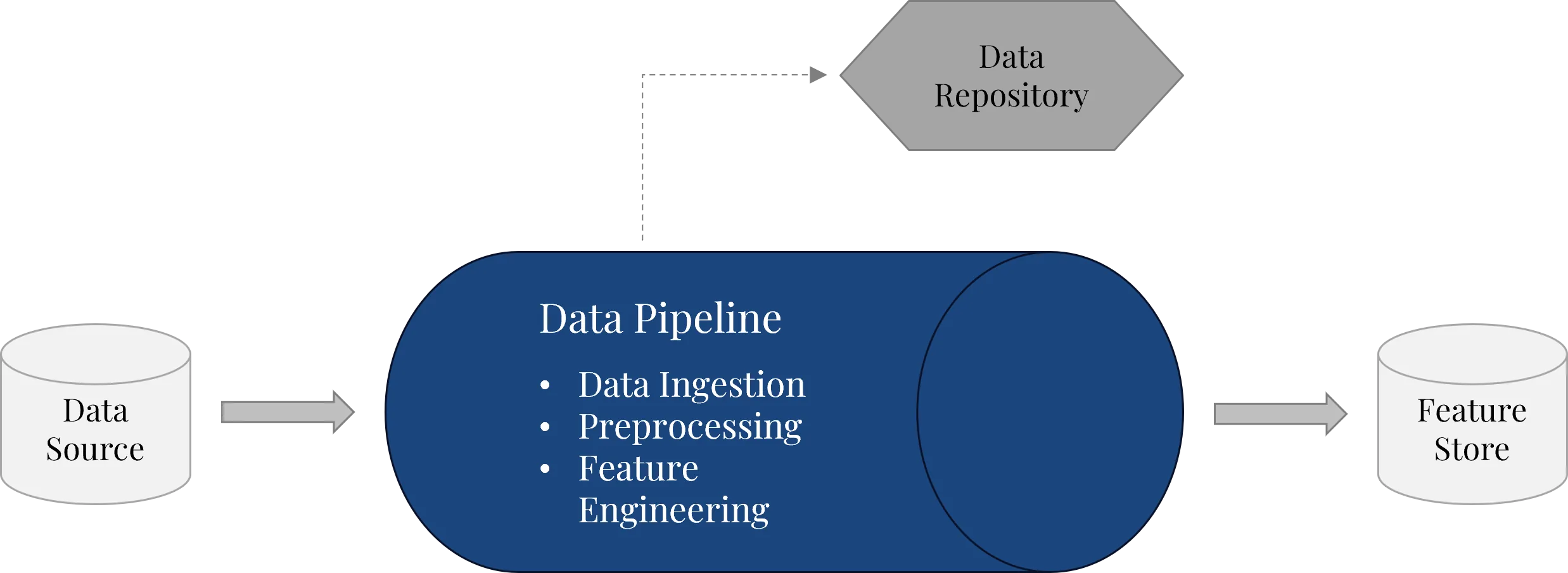
On Microsoft Azure, a data pipeline can be implemented with different services depending on the starting point. Common options are Azure Data Factory, Microsoft Fabric Data Factory, Azure Synapse Pipelines or Azure Databricks. Which one makes sense depends on data volume, data sources, transformation logic, the existing data platform and operational requirements. Technically, a data pipeline should meet three requirements: it must be repeatable, versionable and environment-aware.
- Repeatable: training data should not be exported manually, adjusted locally and uploaded again. Instead, it is clearly defined which data is loaded from which sources and how it is transformed.
- Versionable: changes to data logic, transformations and pipeline configurations should be traceable through Git.
- Environment-aware: development, test and production environments often need different parameters, e.g. for storage accounts, database connections or secrets.
Azure Machine Learning supports this approach through data assets. They point to data sources and store metadata without necessarily copying the data, so data sources can be used via versioned references — improving reproducibility and traceability. When Azure Data Factory is used, the data pipeline logic should also be embedded in a CI/CD process to move pipelines, datasets, data flows and other artefacts from development to test and production in a controlled way.[9][19]
2.2 ML pipeline: automating training, experiments and evaluation
The ML pipeline handles the actual machine learning process. It uses the provided data or features, trains models, evaluates their quality and stores suitable model versions for later deployment.[17][20]
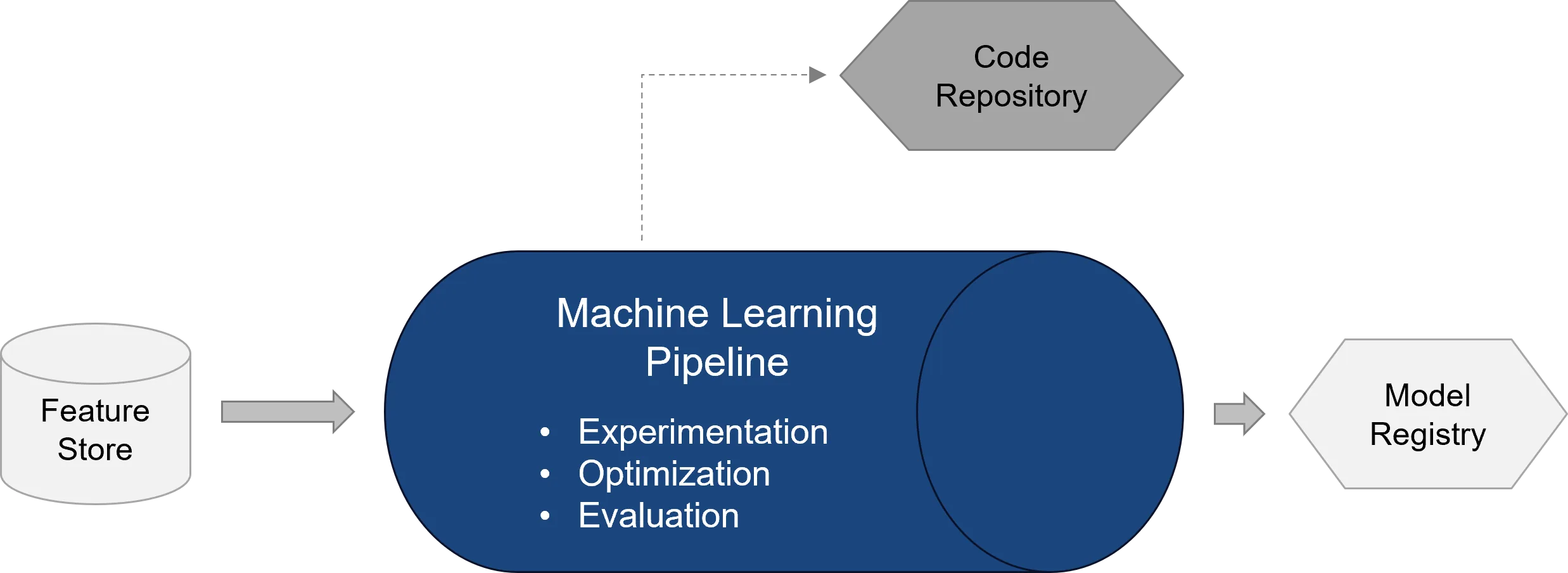
Typical steps of an ML pipeline are:
- Loading a defined data version
- Running preprocessing or feature steps
- Training one or more models
- Hyperparameter tuning
- Evaluation against technical and business metrics
- Comparison with existing model versions
- Registering the best model in the model registry
Azure Machine Learning supports such workflows through pipelines, jobs, components, environments and compute resources. Pipelines can be created with the Azure ML CLI, the Python SDK or via Azure Machine Learning Studio. Components improve the reusability and flexibility of ML pipelines.
A good ML pipeline should not just train a model but also decide whether that model is fit for deployment at all. For this, technical metrics such as accuracy, precision, recall, F1 score or RMSE are combined with business minimum requirements. Depending on the use case, fairness, robustness or stability metrics may also be relevant.
A central component is the model registry. It forms the interface between the ML pipeline and the release pipeline. After training and evaluation, a model is not stored as a loose file but registered as a versioned artefact. The registry records which model version exists, which metrics were achieved and which metadata is associated with the model. Azure Machine Learning registries also enable the reuse and sharing of models, components and environments across multiple workspaces.
2.3 Release pipeline: deploying models in a controlled way
The release pipeline moves an approved model from the model registry into a production environment. It is therefore the bridge between model development and operations.
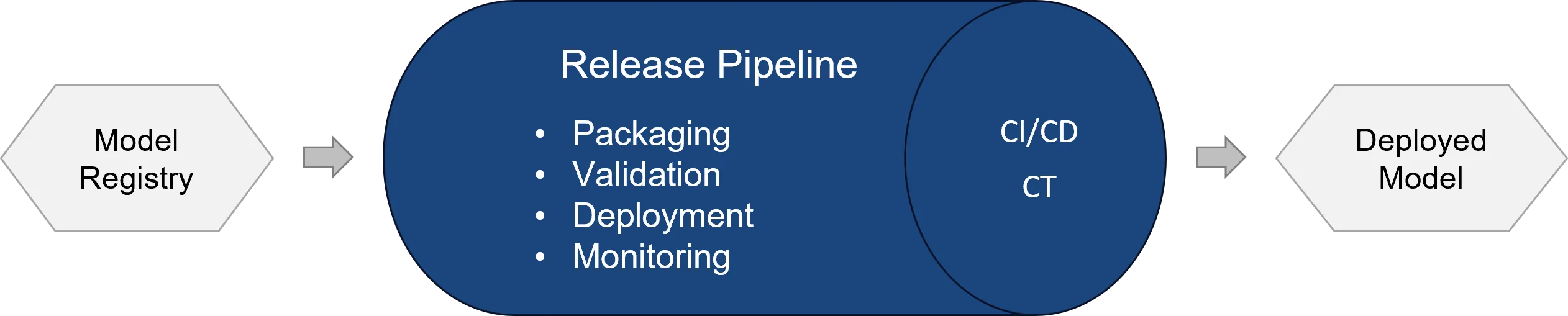
Typical tasks of the release pipeline are:
- Selecting an approved model version
- Packaging the model including dependencies
- Defining or reusing an Azure ML environment
- Creating or updating an endpoint
- Running smoke tests or test inference
- Deploying to a test or production environment
- Approval process with approval gates
- Rollback in case of failure
In Azure Machine Learning, models can be deployed via managed online endpoints or batch endpoints, among others. Managed online endpoints are suited to real-time inference over HTTPS endpoints and are fully managed by Azure — including infrastructure, scaling, security and monitoring. Batch endpoints, by contrast, suit larger, time-shifted prediction runs, for example when forecasts for many records are produced regularly and then processed further in a data warehouse, data lake or BI system.[8]
A professional release pipeline should clearly separate business model logic from operational deployment logic. The model logic lives in training code, feature engineering and the scoring_file.py, for example. The operational logic lives in YAML files, environment definitions, endpoint configurations, pipeline files and deployment parameters. This separation makes the process more maintainable: data scientists can work on models and features, while MLOps engineers standardise deployment, infrastructure, security and automation.
3. Operations, security and governance
Operations begin after deployment. A production ML system must not only be available but continuously monitored, secured and evolved in a controlled way.
Operations in particular includes:
- Monitoring endpoints, latency, error rates and resource usage
- Monitoring model metrics
- Detecting data drift and prediction drift
- Monitoring data quality
- Cost control and alerting
- Retraining triggers
- Documentation and regular reviews
Azure Machine Learning offers model monitoring with built-in signals for tabular data, including data drift, prediction drift, data quality, feature attribution drift and model performance. For online endpoints, Azure Machine Learning can automatically capture production inference data and use it for continuous monitoring.[7]
Security and governance should not be added afterwards but be part of the architecture. This includes role-based access control, managed identities, secure secret management, encryption, network isolation, logging, auditability and clear approval processes. Managed identities are especially important because they let compute resources access other Azure services without hard-coded credentials — for example to retrieve connection information from Key Vault or pull Docker images from Azure Container Registry. This turns MLOps not just into a technical automation approach but into a governance model for production AI systems.[22]
Technical implementation: how an Azure MLOps pipeline is built in practice
Once the target architecture is defined, the practical question follows: how do you actually implement such an MLOps structure? A robust implementation pursues three goals. First, recurring tasks should be automated. Second, infrastructure, data logic, training code and deployments should be versioned. Third, the process should stay modular enough that different ML use cases aren't forced into a rigid architecture.
1. Repository structure
A sensible starting point is a clear repository structure. Depending on team size, it can be a monorepo or a set of separate repositories. An example structure might look like this:
This structure separates four areas of responsibility: infrastructure, data integration, training and deployment. Individual components can evolve independently while the overall process stays standardised.
We provide the complete, runnable example code in two open repositories — one for the infrastructure and one for the pipelines:
smiit-GmbH/azure-iac-with-bicepInfrastructure as code for Azure with Bicep – provision the workspace, storage, container registry, Key Vault, compute and networking reproducibly.smiit-GmbH/azure-mlopsData, ML and release pipelines for Azure Machine Learning, including CI/CD deployment.2. Infrastructure as code with Bicep or Terraform
Infrastructure should be provisioned automatically. This typically includes a resource group, Azure Machine Learning workspace, storage account or data lake, Azure Container Registry, Azure Key Vault, Application Insights, Log Analytics workspace, compute cluster, managed identities, private endpoints and network rules.
Bicep is particularly well suited when companies work heavily in the Azure ecosystem. Its syntax is more compact than classic ARM templates yet stays fully compatible with Azure Resource Manager, since Bicep is transpiled to ARM JSON during deployment. A typical IaC process looks like this:
- 1Commit to infrastructure files
- 2Pull request
- 3Automatic validation
- 4Deployment to development
- 5Optional approval
- 6Deployment to test
- 7Optional approval
- 8Deployment to production
The benefit lies not only in automation but in traceability. Every infrastructure change is versioned, reviewable and easier to roll back in case of failure.
3. CI/CD flow for data pipelines
When Azure Data Factory or Fabric Data Factory is used, the data pipeline should also be deployed via CI/CD. Pipeline definitions, datasets, linked services and triggers are not adjusted manually in every environment but promoted in a controlled way.
- 1Feature branch
- 2Change to data pipeline logic
- 3Pull request
- 4Validation of pipeline artefacts
- 5Export as ARM template
- 6Deployment to dev
- 7Deployment to test
- 8Deployment to prod
In production environments it is also important to handle triggers carefully. Before a deployment, active triggers should be stopped and restarted after a successful deployment. Microsoft provides sample scripts for these pre- and post-deployment steps.
4. CI/CD flow for ML pipelines
The ML pipeline should also be runnable automatically. The process usually starts with a change to the training code, a component or the pipeline configuration.
- 1Commit to training code or pipeline YAML
- 2Pull request
- 3Linting and tests
- 4Validation of Azure ML configurations
- 5Run the training pipeline
- 6Evaluate the model metrics
- 7Register the model
- 8Tag the model version
Azure Machine Learning supports YAML-based configurations for jobs and pipelines: Azure ML entities can be defined via schematised YAML files and created through the Azure ML CLI. The benefit is that pipeline definitions can be treated like code — changes go through pull requests, can be validated automatically and run reproducibly later. An ML pipeline should also not push every model to production automatically, but only register or mark a model version for release when defined quality criteria are met.[18]
5. Release pipeline for online or batch deployment
The release pipeline handles the controlled deployment of a registered model, bringing together the model version, environment, endpoint configuration and deployment parameters. For an online endpoint you typically need the registered model, scoring_file.py, an environment or Docker image, endpoint and deployment configuration, test data for smoke tests, monitoring configuration and approval rules.
- 1Select a model version from the registry
- 2Validate the deployment configuration
- 3Build or select the environment
- 4Deploy to test
- 5Smoke test
- 6Approval
- 7Deploy to production
- 8Activate monitoring
Managed online endpoints are particularly useful when a model is integrated into applications, workflows or platforms via an API. Batch endpoints make sense when predictions are produced regularly for large data volumes, e.g. for forecasting, scoring or background classification. The endpoint decision should therefore not be made in technical isolation but depend on the business process: if the result has to be available immediately, an online endpoint is the better fit; if it is processed periodically, a batch endpoint is often simpler and more cost-efficient.
6. Monitoring and retraining triggers
The MLOps process does not end with deployment. A model can degrade over time even if nothing changes in the code. Causes include shifting data distributions, new user behaviour, changed business processes or external market conditions. Monitoring should therefore cover several levels: technical availability, latency and error rates, resource usage and cost, data quality, data drift, prediction drift, model performance and business outcome quality.
Azure Machine Learning model monitoring supports built-in signals such as data drift, prediction drift, data quality and model performance. This makes changes visible before they cause larger business problems. A complete MLOps loop can look like this:
- 1Model runs in production
- 2Monitoring detects drift or quality loss
- 3An alert is triggered
- 4Retraining starts manually or automatically
- 5A new model is trained
- 6The model is evaluated
- 7The model is registered
- 8The release pipeline deploys the new version
Not every company should run fully automated retraining from the start. In many cases a controlled human-in-the-loop process is more sensible: monitoring raises an alert, a data science or MLOps team assesses the cause and then decides on retraining or deployment.
MLOps maturity: not everything needs full automation right away
A common mistake is to think of MLOps straight away as a complete enterprise platform. For many companies, a step-by-step build-up makes more sense. Microsoft's MLOps Maturity Model describes MLOps as a maturity process and helps to build capabilities gradually, assess the current state, identify gaps and plan the next sensible step. A pragmatic maturity path can look like this:[6][14]
- 0
Level 0Manual ML processes
- 1
Level 1Versioned code and defined data sources
- 2
Level 2Automated training
- 3
Level 3Standardised deployment
- 4
Level 4Monitoring and controlled retraining
- 5
Level 5Fully integrated MLOps platform
For many organisations, real progress is already made when code, data, models and deployments are versioned cleanly and manual deployment steps are reduced. Fully automated retraining, canary deployments or organisation-wide model registries can be added later.
Best practices for Azure MLOps
- 1Treat models like production softwareA model is not a notebook result but a production artefact with versioning, tests, approval processes, deployment strategies and monitoring.
- 2Consider data, code and model versions togetherReproducibility only emerges when it is clear which data version, code state, parameters and model version belong together.
- 3Build pipelines modularlyThe data pipeline, ML pipeline and release pipeline should be separate but integrable, so teams can reuse components and automate use cases to different degrees.
- 4Use infrastructure as code consistentlyCloud infrastructure should not be maintained manually. IaC ensures consistent environments, versioned changes and reproducible deployments.
- 5Integrate security earlyAccess rights, managed identities, Key Vault, private endpoints, logging and network isolation don't belong just before go-live.
- 6Extend monitoring to the model and data levelCPU, RAM and availability aren't enough for ML systems — data quality, drift, model metrics and business outcome quality must be monitored too.
- 7Balance standardisation and flexibilityStandardise infrastructure, deployment, security, monitoring and governance; keep model choice, feature engineering, business metrics and use-case-specific logic flexible.
Conclusion: MLOps makes machine learning production-ready
Machine learning delivers its value not in the prototype but in production. For that, training a good model is not enough. Companies need reproducible data pipelines, automated training processes, controlled deployments, versioned models, monitoring, security and governance.
Microsoft Azure offers a powerful platform for this. Azure Machine Learning, Azure DevOps, GitHub Actions, Bicep, Key Vault, managed identities, Azure Monitor and Azure data services can be combined into a robust MLOps architecture. The decisive success factor, however, is not just the technology but the right architecture: a good MLOps framework standardises recurring operational processes without restricting the business flexibility of individual ML projects. That turns isolated ML prototypes into a scalable, secure and maintainable foundation for production AI applications.