Security starts in front of the application
Web applications and APIs are among the most important interfaces between companies, customers, partners and internal systems. They are often exposed directly via a public App Service, a container platform or an API gateway. For a first application this can be sufficient. But as requirements for security, availability and scalability grow, additional challenges quickly arise.
Alongside the application itself, TLS certificates have to be managed, application-layer attacks detected, multiple backends routed and the failure of individual instances absorbed. At the same time, attackers should be prevented from bypassing upstream security controls and reaching the origin service directly.
Azure Front Door sits in front of the actual application. The service forms a globally distributed edge layer that accepts incoming HTTP and HTTPS traffic, inspects it via a web application firewall and forwards it in a controlled way to suitable origin services. Combined with Private Link, Azure Monitor and infrastructure as code, this creates a central, reproducible entry point for modern enterprise web applications.
This article shows how Azure Front Door can be used in such an architecture, which tasks the WAF and Private Link take on, and which best practices should be considered for routing, monitoring and deployment.
Note: this article refers to Azure Front Door Standard and Premium. Azure Front Door Classic will be retired on 31 March 2027 and should no longer be used for new architectures.[1]
Why publicly reachable web applications need additional protection
Many web applications begin with a comparatively simple architecture: a frontend or an API runs on Azure App Service, Azure Container Apps, Azure Kubernetes Service or a virtual machine and is made reachable via a public HTTPS endpoint.
That is technically straightforward, but it combines several responsibilities in a single component. The origin service accepts public traffic, terminates TLS and processes the actual application logic at the same time. Security rules, certificates, routing and monitoring are often configured separately per application.
As usage grows, typical challenges arise:
- Multiple applications need different domains and certificates.
- APIs and frontends should be reachable via shared or separate paths.
- Attacks such as SQL injection, cross-site scripting or automated bot access should be detected as early as possible.
- An application should stay reachable even if an instance or region fails.
- Static content should be delivered performantly to geographically distributed users.
- Security and routing configurations should stay consistent across development, test and production environments.
The OWASP Top 10 document central security risks of modern web applications. An upstream web application firewall can detect and block some of these attack patterns. But it replaces neither secure software development nor correct authentication and authorisation.[2]
A further problem arises when a WAF is placed in front of the application but the original App Service or API endpoint remains freely reachable. The intended path leads through the firewall:
In that case, the WAF only protects the traffic that actually passes through it. If an attacker knows the technical hostname of the origin, they can try to call it directly, bypassing the firewall.
From the perspective of a zero-trust architecture, traffic should not be trusted simply because it uses a certain network path. NIST describes zero trust as a security model that puts resources and explicit access decisions at the centre, instead of deriving implicit trust from a network location. Applied to a web architecture this means: the intended access path should not only be documented, but technically enforced.[3]
- Direct public originInternet → public App Service. Risks: direct origin access, decentralised TLS configuration, no central WAF, inconsistent monitoring.
- Controlled access via Front DoorInternet → Azure Front Door + WAF → private origin. Benefits: controlled entry point, central security rules, private origin, consistent logging.
What Azure Front Door means in practice
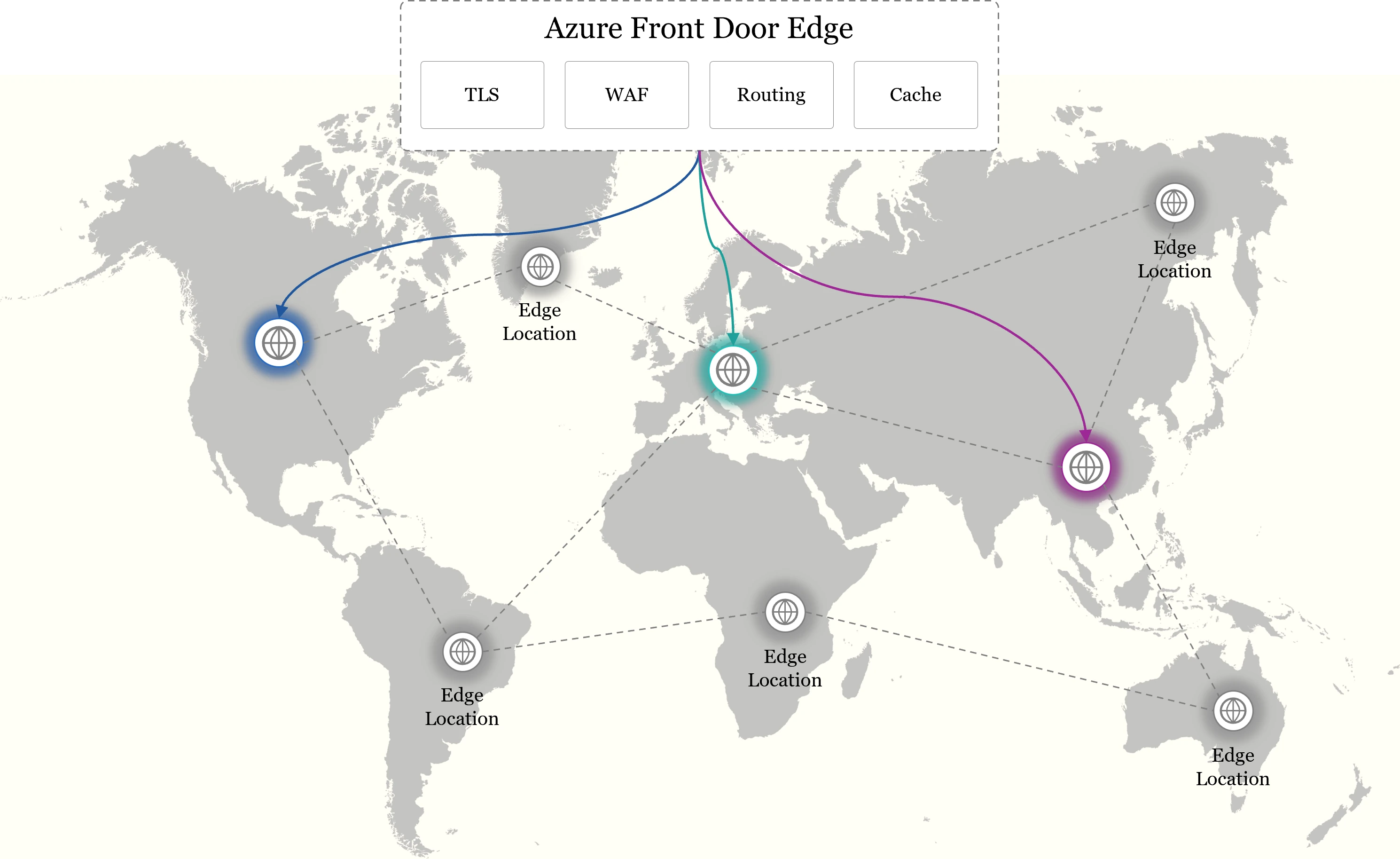
Azure Front Door is Microsoft's global application delivery and content delivery service for HTTP and HTTPS applications. It uses Microsoft's global edge network to accept requests at geographically distributed points of presence and then forward them to suitable origin services.[4]
Simplified, Azure Front Door can be understood as a kind of globally distributed reverse proxy:
The client does not connect directly to the App Service or API gateway. Instead, it calls a custom domain such as app.example.com that is connected to Azure Front Door. Front Door accepts the request, checks it against the configured rules and forwards it to a suitable origin.
Its central capabilities include:
- Global HTTP and HTTPS routingRequests are mapped to different applications or APIs based on domains and URL paths, e.g. /api/* to API Management.
- Web application firewallThe integrated WAF protects applications with Microsoft-managed and custom rules against typical attacks and unusual access patterns.
- TLS and certificate managementFront Door terminates TLS at the edge and manages certificates for custom domains, including automatic renewal.
- Caching and compressionSuitable content is cached at edge locations and served closer to the user, reducing latency and origin load.
- Health-based origin selectionWith multiple origins, Front Door checks their availability and reroutes requests to another origin on failure.
- Private origin connectivityAzure Front Door Premium connects supported Azure services via Private Link, so the origin no longer has to be reachable over the public internet.
Azure Front Door is therefore more than a classic load balancer. It combines global traffic distribution, web security, content delivery and origin protection in a shared edge layer.[5]
Research on content delivery networks likewise shows that globally distributed delivery structures bring both performance advantages and their own security requirements. Yang et al., for example, study DoS and cache-pollution attacks in real CDN data and highlight the importance of multi-layered analysis and monitoring mechanisms.[6]
Why Microsoft Azure is a good approach for secure web architectures
The key advantage of Azure Front Door lies not only in the individual service, but in its integration with other Azure components.
A typical enterprise web architecture can combine, among others, the following services:
- Azure Front Door as the global entry point,
- web application firewall to protect HTTP traffic,
- Azure App Service or Container Apps for the application,
- Azure API Management for API governance,
- Private Link for protected origin connections,
- Key Vault for certificates and secrets,
- Azure Monitor and Log Analytics for monitoring,
- Microsoft Entra ID for identities and access control,
- Bicep or Terraform for infrastructure as code,
- Azure DevOps or GitHub Actions for CI/CD.
This lets network, identities, applications, monitoring and deployment be integrated into a shared operating model.
Front Door, Application Gateway and API Management
Because several Azure services process HTTP traffic, their responsibilities are often confused. Azure Front Door is used before the traffic reaches the actual application region. Application Gateway, by contrast, is a regional service and suits, for example, a VNet-close ingress for virtual machines or Kubernetes workloads.
API Management, in turn, does not handle global content delivery but API-specific tasks such as token validation, transformations, versioning, quotas and the management of API products. The services can be combined, but don't have to be. A typical SaaS application on App Service often needs Azure Front Door and API Management, but no additional Application Gateway. Multiple gateways should only be used when each fulfils a clearly defined responsibility.
Architecture note: an architecture does not automatically become more secure by chaining together as many security and network services as possible. What matters is clear responsibilities and a controlled request flow.
Delineation from self-managed proxies (NGINX, Traefik)
NGINX and Traefik are powerful reverse proxies and load balancers. They are particularly well suited as a regional ingress for container, Docker or Kubernetes environments, for internal routing and for architectures where companies want to keep as much control over configuration and operations as possible. Traefik can automatically discover services from orchestration platforms, while NGINX provides very flexible proxy, routing and load-balancing capabilities.[15][16]
However, they are not directly equivalent to Azure Front Door. Azure Front Door is a fully managed, globally distributed edge service. It combines Microsoft's worldwide network with WAF, DDoS protection, certificate management, CDN caching, health-based global routing and the private connection of supported Azure origins. With a self-operated solution, high availability, global distribution, scaling, updates, certificates, WAF, DDoS protection and monitoring would all have to be built and run separately. Both approaches can also be combined: Front Door handles the global edge layer, while NGINX or Traefik serve as an ingress within a region.[4][5][17]
Target architecture: Azure Front Door in an enterprise application
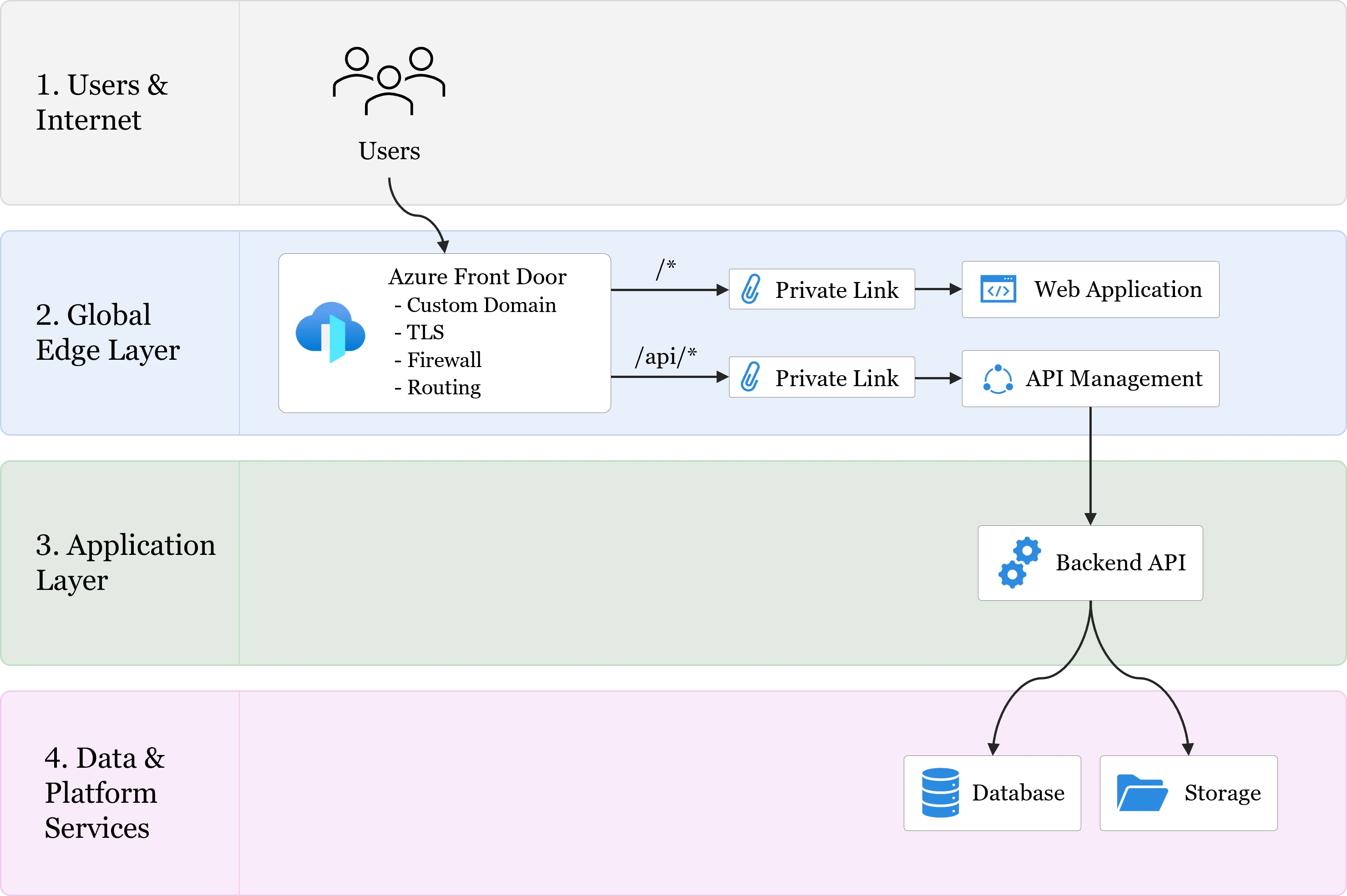
A possible target architecture consists of a browser-based web application, an API and several private platform services. Only Azure Front Door is in the public zone; all downstream services are connected via Private Link.
Azure Front Door as the central entry point
All public domains of the application point to Azure Front Door. Front Door handles TLS, WAF inspection and routing. The technical hostname of the App Service or API gateway is not used as a public entry point.
This creates a central place for:
- domains and certificates,
- security rules,
- HTTP-to-HTTPS redirects,
- URL routing,
- caching,
- health checks,
- access logs.
Separate routes for frontend and API
Frontend and API can be published via different domains:
app.example.com   →  web application
api.example.com   →  API Management
Alternatively, both can be reachable via the same domain:
app.example.com/*       →  web application
app.example.com/api/*   →  API Management
A shared domain often simplifies browser-based applications because fewer cross-origin configurations are required. A separate API domain, by contrast, makes sense when the API is also used by mobile applications, partners or other systems.
Web application firewall at the edge
The WAF inspects requests before they consume resources of the App Service or API Management. Microsoft recommends using the WAF with managed rules for internet-facing applications. The rules should first be tuned to the actual traffic, otherwise legitimate requests can be blocked by mistake. During this tuning, the policy can log in detection mode without blocking traffic.[7]
The WAF complements application security but does not replace it. Whether a user may access a specific record must still be checked by the application or API.
Private origins
The most important security gain arises when the origin is not reachable independently of Front Door. Azure Front Door Premium can connect supported PaaS services via Private Link. The origin should additionally be configured so that it accepts no traffic that does not arrive over this private connection.[5]
If Private Link is not available, access can be restricted, for example, via the AzureFrontDoor.Backend service tag and by checking the profile-specific X-Azure-FDID header. This variant is less rigorous than a private origin, but likewise prevents arbitrary clients from using the origin directly.[8]
API Management as a second security layer
API Management complements Front Door with API-specific controls. While the WAF examines technical attack patterns, API Management can, for example:
- validate OAuth and JWT tokens,
- check required claims and scopes,
- apply limits per subscription or user,
- transform requests and responses,
- manage API versions,
- hide internal backend endpoints.
Microsoft supports both publicly restricted and privately connected APIM origins behind Azure Front Door.[8]
Implementation: how Azure Front Door is set up in concrete terms
Once the target architecture is defined, the practical question is how it can be implemented and operated reproducibly. A robust implementation pursues five goals:
- Front Door is the only intended public access path.
- Security rules are introduced and monitored in a controlled way.
- Routing and health checks reflect the actual application structure.
- Infrastructure changes are deployed in a versioned way.
- Errors can be traced via central logs.
1. Define domains and routing
First, the public domains and the desired request paths are defined. The routing structure should stay as simple as possible. One possible model is:
app.example.com/*       →  frontend-origin-group
app.example.com/api/*   →  api-origin-group
In addition to path-based routing, Azure Front Door supports different methods for selecting an origin. Priorities enable, for example, an active-passive architecture, while weights can be used for gradual migrations or canary deployments.[9]
The architecture should not start with complex routing when only one origin is needed. For many applications, a single region with a clearly defined frontend and API path is enough at first.
2. Introduce the WAF in a controlled way
The WAF should be activated with Microsoft's managed rules. Custom rules can additionally be added for application-specific requirements, for example:
- rate limits for login or export endpoints,
- restriction of administration paths,
- blocking of unneeded HTTP methods,
- geo filters for regionally limited applications,
- handling of known bots.
A controlled rollout is recommended for the introduction:
Blanket exceptions should be avoided. If a single search field falsely triggers a SQL injection rule, only that specific field should be excluded for the affected rule. Fully disabling all SQL injection rules would unnecessarily reduce the protective effect.
Rate limits should also not be set too low. Many legitimate users may also share a common corporate or mobile IP. Microsoft generally recommends sufficiently high thresholds that limit extreme usage without prematurely blocking legitimate traffic.[7]
3. Secure the origins
With Azure Front Door Premium, Private Link is the preferred option for supported origins:
After setup, the private endpoint connection must be approved at the respective service. Public network access to the origin should then be disabled, as far as the service and operating model allow.
A practical test should not only check whether the application is reachable via Front Door, but also whether a direct request to the origin fails:
- Test 1 – access via Front DoorRequest via Azure Front Door. Expectation: 200 OK.
- Test 2 – direct origin accessDirect request to the origin. Expectation: access blocked.
This negative test is particularly important. A working Front Door route does not automatically prove that no alternative access path exists any more.
4. Configure health checks and performance
With multiple origins, Front Door uses health probes to assess their availability. The health endpoint (e.g. /healthz) should return a clear 200 OK status and check the components actually required to process production traffic. Microsoft recommends resource-friendly HEAD requests by default for new profiles. The endpoint should not trigger a redirect to a login page and should not perform unnecessarily expensive database or API queries.[10]
Caching should only be enabled for clearly suitable content, for example:
- JavaScript and CSS files,
- images,
- fonts,
- public downloads,
- non-personalised content.
Dynamic or user-specific responses require particular caution. Query strings and cache keys determine whether different requests are treated as the same resource. In the worst case, an unsuitable configuration can cause personalised content to be delivered to other users.[11]
5. Enable monitoring
Front Door access logs, health probe logs and WAF logs are not enabled automatically. They should be sent via diagnostic settings to Log Analytics or another central logging platform.[12]
Basic monitoring should cover at least the following metrics:
- request count,
- response times,
- 4xx and 5xx errors,
- blocked WAF requests,
- frequently triggered WAF rules,
- origin availability,
- cache hit rate,
- outbound data volume.
Azure Monitor and Log Analytics make it possible to investigate errors across multiple layers. For example, it can be distinguished whether a request was already blocked by the WAF, Front Door found no healthy origin, or the application itself returned an error.[13]
6. Infrastructure as code and CI/CD
Front Door, WAF policies, routes, origins and diagnostic settings are production-critical configurations. They should not be maintained exclusively by hand in the Azure portal.
With Bicep or Terraform they can be described declaratively and changed in a controlled way via pull requests. Microsoft explicitly recommends infrastructure as code to deploy Front Door configurations consistently and to manage changes such as new WAF rule versions traceably. The full implementation should be built modularly:[14]
- main.bicep
We provide example code showing how infrastructure as code can be implemented with Bicep in an open repository:
smiit-GmbH/azure-iac-with-bicepInfrastructure as code for Azure — reproducible with Bicep.A possible deployment process is:
This not only automates recurring tasks. Every change to routing, WAF or origin configuration is versioned, reviewable and easier to trace in case of an error.
Architecture maturity: not every application needs multi-region right away
A common mistake is to plan Azure Front Door directly as a global active-active platform with multiple regions. Technically that is possible, but not economically or operationally sensible for every application.
A second application region alone does not yet create a complete multi-region architecture. In addition, data replication, identity providers, storage, messaging, background processes and failback procedures have to be considered. For many companies, a step-by-step build-up is therefore sensible:
- 0
Level 0Direct public origin
- 1
Level 1Central entry point (Front Door)
- 2
Level 2WAF and monitoring
- 3
Level 3Protected origin
- 4
Level 4Private Link and infrastructure as code
- 5
Level 5Multi-region and automated failover
Level 0 means direct access to the technical endpoint with decentralised management. At level 1, Front Door becomes the central domain and routing layer; at level 2, managed WAF rules and monitoring are added. From level 3, direct origin access is restricted and Front Door becomes the binding access path; at level 4, Private Link and infrastructure as code follow. Level 5 finally connects multiple regions via priority- or weight-based routing.
For many applications, level 3 or 4 already represents major progress. Multi-region should be added when business requirements for availability, recovery time objective and recovery point objective justify the additional effort.
Best practices for Azure Front Door
- 1Establish Front Door as the binding entry pointA WAF only protects the traffic that actually passes through it. The origin should not remain reachable via an alternative public path.
- 2Prefer Private LinkFor supported Azure services, Azure Front Door Premium with Private Link offers the most rigorous origin protection. If Private Link is not possible, service tags and profile-specific header checks should be combined.
- 3Introduce the WAF graduallyA new policy should first be observed in detection mode. Only after analysing legitimate requests and necessary exceptions should it actively block traffic.
- 4Define exceptions as narrowly as possibleDon't disable a whole rule group when only a single request field causes a false positive. The smaller the exception, the greater the protection that remains.
- 5Use caching deliberatelyCaching is mainly suitable for static, non-personalised content. Query strings, cookies and authorisation headers must be explicitly considered when designing the cache.
- 6Version configurationsFront Door, WAF policies, routes, domains and diagnostic settings should be described as code and deployed via a controlled CI/CD process.
- 7Derive the architecture from business requirementsNot every application needs multiple regions, additional gateways or highly complex routing. The technical shape should emerge from security, availability and performance requirements.
Conclusion: a secure edge layer for modern web applications
Azure Front Door is more than a global load balancer. The service combines traffic routing, TLS, content delivery, a web application firewall and origin connectivity in a shared edge layer.
The biggest security gain does not come from activating a WAF alone. What matters is that Front Door becomes the binding entry point of the application and that alternative access to the origin is technically prevented.
Combined with Azure Front Door Premium, Private Link, API Management, Azure Monitor and infrastructure as code, this creates an architecture that can be operated securely and reproducibly. Domains, routing and security rules are managed centrally, while frontend, API and data platform retain clearly separated responsibilities.
At the same time, not every application has to be built as a global multi-region platform straight away. A step-by-step maturity path is often more economical and operationally more robust: first a central entry point, then WAF and monitoring, then origin protection and Private Link. Multi-region and automated failover follow only when the business requirements justify them. This way, Azure Front Door does not become just another upstream Azure resource, but a central component of a secure and scalable enterprise web architecture.